If you’re a developer and you haven’t started experimenting with AI-powered applications yet, you’re already behind the curve. But here’s the good news: Python makes it incredibly accessible, even if you’ve never touched machine learning in your life.
Whether you want to build a smart chatbot, an intelligent document analyzer, a recommendation engine, or a fully autonomous AI agent, Python has the libraries, the community, and the ecosystem to make it happen fast. In this guide, we’re going to walk through everything — from picking the right tools and frameworks to calling APIs, managing memory, and shipping your app to production. No fluff, just practical stuff you can start using today.
Ready? Let’s build something intelligent.
Why Python Is Still the King of AI Development
There’s a reason Python consistently dominates AI and machine learning rankings year after year. It’s not just popularity for popularity’s sake — there are real, practical reasons developers keep reaching for Python when it’s time to build AI applications.
For starters, Python has the richest ecosystem of AI-related libraries in existence. From data manipulation with pandas and numerical computing with NumPy, to deep learning with PyTorch and TensorFlow, almost every major AI framework either started with Python or made it a first-class citizen.
Beyond libraries, Python’s readable syntax means you can prototype fast. When you’re iterating on a prompt strategy or testing a new retrieval method, you don’t want to wrestle with boilerplate code. Python gets out of your way and lets you focus on the logic that matters.
And then there’s the community. The sheer volume of tutorials, open-source projects, and Stack Overflow answers surrounding Python AI development is unmatched. When you hit a wall — and you will — help is never far away.
Understanding the AI App Stack: What You're Actually Building
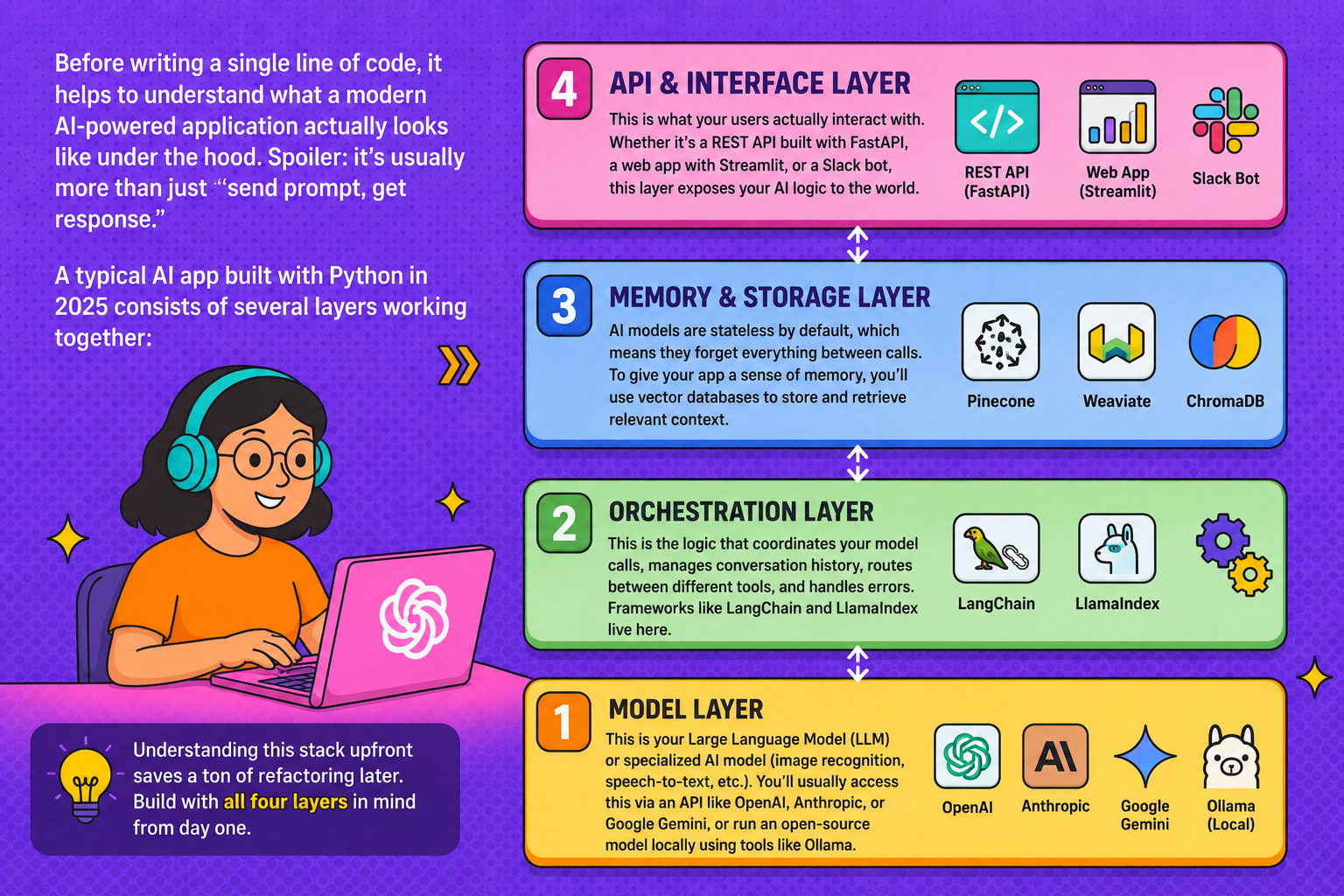
Before writing a single line of code, it helps to understand what a modern AI-powered application actually looks like under the hood. Spoiler: it’s usually more than just “send prompt, get response.”
A typical AI app built with Python in 2025 consists of several layers working together: →
→ The Model Layer — This is your Large Language Model (LLM) or specialized AI model (image recognition, speech-to-text, etc.). You’ll usually access this via an API like OpenAI, Anthropic, or Google Gemini, or run an open-source model locally using tools like Ollama.
→ The Orchestration Layer — This is the logic that coordinates your model calls, manages conversation history, routes between different tools, and handles errors. Frameworks like LangChain and LlamaIndex live here.
→ The Memory and Storage Layer — AI models are stateless by default, which means they forget everything between calls. To give your app a sense of memory, you’ll use vector databases like Pinecone, Weaviate, or ChromaDB to store and retrieve relevant context.
→ The API and Interface Layer — This is what your users actually interact with. Whether it’s a REST API built with FastAPI, a web app with Streamlit, or a Slack bot, this layer exposes your AI logic to the world.
Understanding this stack upfront saves a ton of refactoring later. Build with all four layers in mind from day one.
Setting Up Your Python AI Development Environment
Getting your environment right is one of those things developers often rush through — and then regret. Here’s how to do it properly.
Use a virtual environment. Always. Whether you prefer venv, conda, or the newer uv package manager (which is blazing fast), isolating your project dependencies prevents version conflicts that can derail a project.
					python -m venv ai-app-env
source ai-app-env/bin/activate  # On Windows: ai-app-env\Scripts\activate
Install the core libraries you’ll need for most AI projects:
pip install openai anthropic langchain chromadb fastapi uvicorn python-dotenv
Manage your API keys securely. Never hardcode API keys in your source code. Use a .env file and the python-dotenv library to load them at runtime:
					from dotenv import load_dotenv
import os

load_dotenv()
api_key = os.getenv("OPENAI_API_KEY")
And yes, add .env to your .gitignore before your first commit. Trust us on this one.
Calling LLM APIs: Where the Magic Actually Happens
If you’re building an AI-powered app, you’re almost certainly going to be calling an LLM API. Let’s look at how to do this cleanly with Python.
Here’s a basic example using the Anthropic Python SDK to call Claude:
					import anthropic

client = anthropic.Anthropic()

message = client.messages.create(
    model="claude-opus-4-5",
    max_tokens=1024,
    messages=[
        {"role": "user", "content": "Summarize this article in 3 bullet points: ..."}
    ]
)

print(message.content[0].text)
A few things to keep in mind when working with LLM APIs:
Streaming matters for UX. Instead of waiting for the full response before showing anything to the user, stream the output token by token. Both OpenAI and Anthropic support streaming, and most frontend frameworks can handle streamed responses gracefully. Users tolerate “seeing it type” far better than staring at a loading spinner.
System prompts are your foundation. The system prompt defines your AI’s personality, constraints, and behavior. Spend serious time crafting it. A well-written system prompt can eliminate entire categories of bugs and misbehavior.
Token limits are real. Every model has a context window — a maximum number of tokens it can process in one call. For long documents or extended conversations, you’ll need to implement chunking or summarization strategies to stay within limits.
Building Smarter Apps with RAG (Retrieval-Augmented Generation)
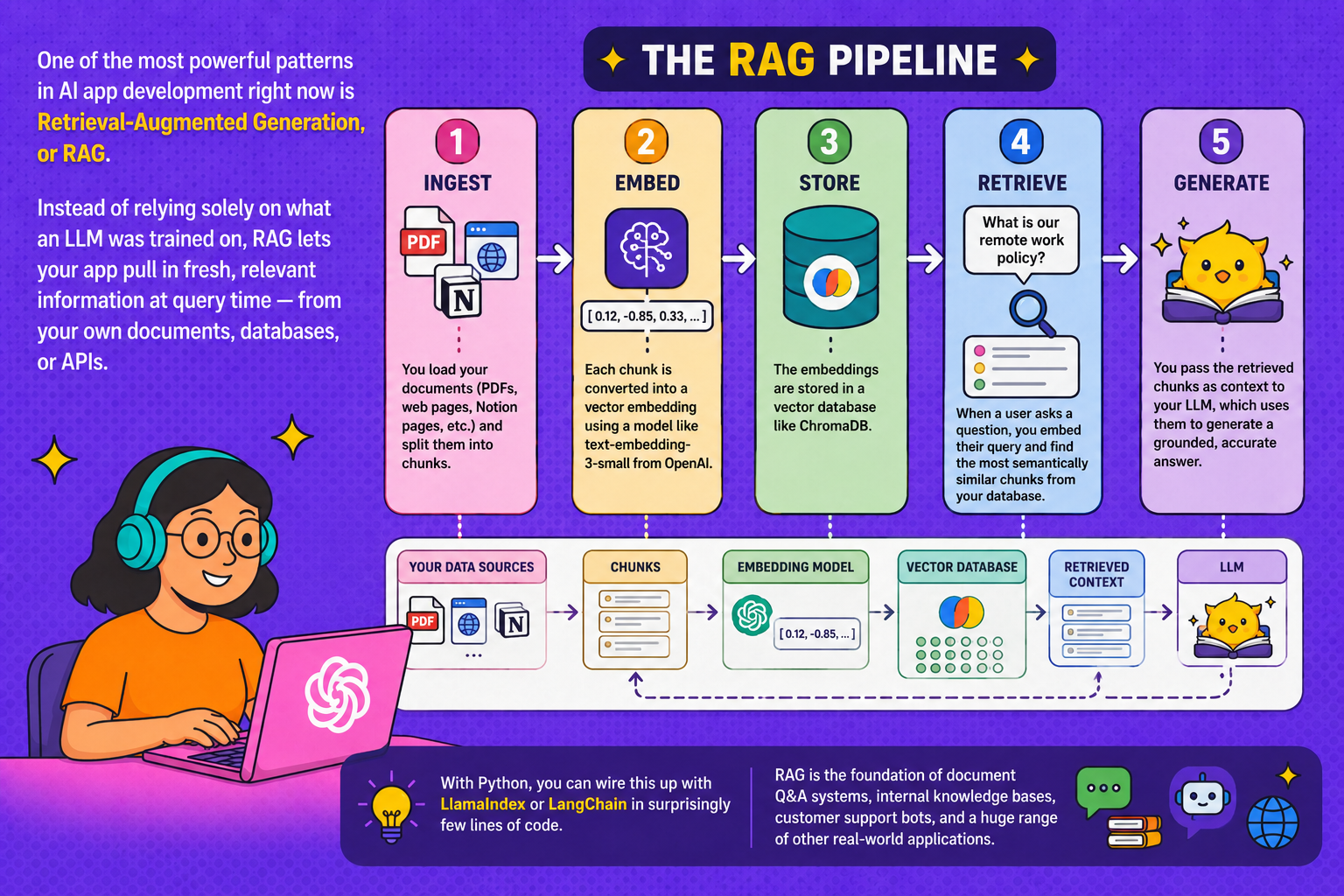
One of the most powerful patterns in AI app development right now is Retrieval-Augmented Generation, or RAG. Instead of relying solely on what an LLM was trained on, RAG lets your app pull in fresh, relevant information at query time — from your own documents, databases, or APIs.
Here’s how a RAG pipeline works in practice:
→ Ingest — You load your documents (PDFs, web pages, Notion pages, etc.) and split them into chunks.
→ Embed — Each chunk is converted into a vector embedding using a model like text-embedding-3-small from OpenAI.
→ Store — The embeddings are stored in a vector database like ChromaDB.
→ Retrieve — When a user asks a question, you embed their query and find the most semantically similar chunks from your database.
→ Generate — You pass the retrieved chunks as context to your LLM, which uses them to generate a grounded, accurate answer.
With Python, you can wire this up with LlamaIndex or LangChain in surprisingly few lines of code. RAG is the foundation of document Q&A systems, internal knowledge bases, customer support bots, and a huge range of other real-world applications.
AI Agents: When Your App Needs to Take Action
Chatbots are cool, but AI agents are where things get genuinely exciting. An agent doesn’t just respond to questions — it can reason through a problem, decide which tools to use, take actions, observe results, and iterate until it achieves a goal.
With Python and frameworks like LangGraph or AutoGen, you can build agents that browse the web, write and run code, send emails, query databases, call external APIs, and more.
The key concept is the tool — a function you define and expose to the LLM, which can choose to call it when needed. Here’s a simple example:
					def get_weather(city: str) -> str:
    """Returns the current weather for a given city."""
    # Call a weather API here
    return f"The weather in {city} is 72°F and sunny."
When you register this as a tool with your agent, the LLM can decide on its own when to call it — based purely on the user’s intent. The model reads your function’s docstring to understand what it does, so clear documentation is literally part of how the agent works. Write good docstrings.
Handling Memory and State in AI Applications
Statelessness is one of the trickiest aspects of working with LLMs. By default, every API call is completely independent — the model has no idea what was said in previous turns unless you explicitly pass that context in.
For short conversations, the simplest approach is to maintain a message list and pass it with every call:
					conversation_history = []

def chat(user_message):
    conversation_history.append({"role": "user", "content": user_message})

    response = client.messages.create(
        model="claude-opus-4-5",
        max_tokens=1024,
        messages=conversation_history
    )

    assistant_message = response.content[0].text
    conversation_history.append({"role": "assistant", "content": assistant_message})
    return assistant_message
For longer-running applications, this approach runs into context window limits fast. That’s where more sophisticated memory systems come in — summarizing older parts of the conversation, storing key facts in a database, or using a vector store to retrieve relevant memories on demand.
MemGPT and LangChain’s memory modules are worth exploring if your app involves extended interactions where remembering user preferences, past decisions, or accumulated knowledge is important.
Testing and Evaluating Your AI App
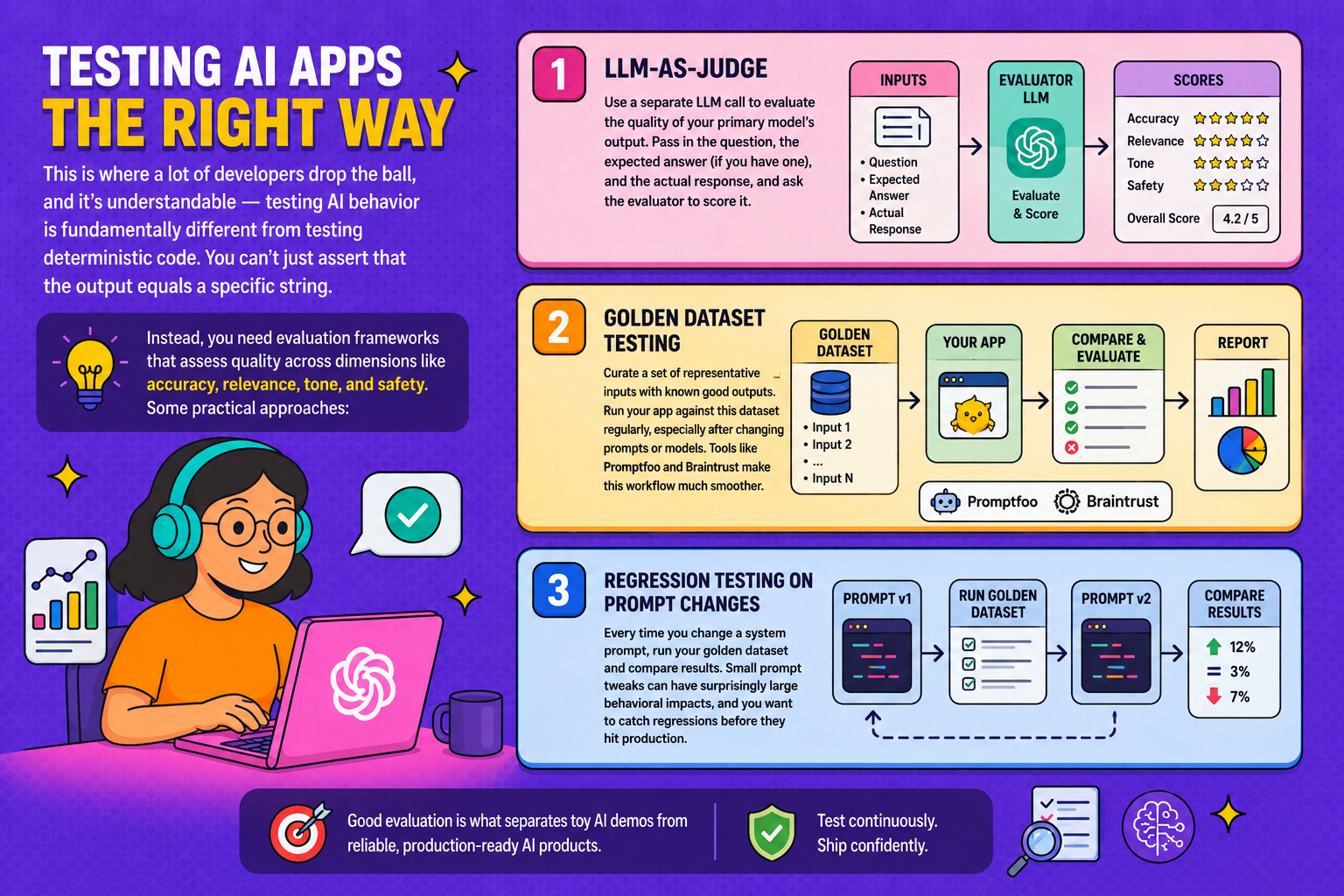
This is where a lot of developers drop the ball, and it’s understandable — testing AI behavior is fundamentally different from testing deterministic code. You can’t just assert that the output equals a specific string.
Instead, you need evaluation frameworks that assess quality across dimensions like accuracy, relevance, tone, and safety. Some practical approaches:
LLM-as-judge — Use a separate LLM call to evaluate the quality of your primary model’s output. Pass in the question, the expected answer (if you have one), and the actual response, and ask the evaluator to score it.
Golden dataset testing — Curate a set of representative inputs with known good outputs. Run your app against this dataset regularly, especially after changing prompts or models. Tools like Promptfoo and Braintrust make this workflow much smoother.
Regression testing on prompt changes — Every time you change a system prompt, run your golden dataset and compare results. Small prompt tweaks can have surprisingly large behavioral impacts, and you want to catch regressions before they hit production.
Deploying Your Python AI App to Production
You’ve built something that works locally. Now let’s get it in front of users.
FastAPI is the go-to choice for wrapping your AI logic in a REST API. It’s fast, it supports async natively (important for handling concurrent LLM calls), and it auto-generates API documentation via Swagger UI.
					from fastapi import FastAPI
from pydantic import BaseModel

app = FastAPI()

class ChatRequest(BaseModel):
    message: str

@app.post("/chat")
async def chat(request: ChatRequest):
    response = await get_ai_response(request.message)
    return {"response": response}
For deployment, Railway, Render, and Fly.io are popular choices for getting Python APIs live quickly without deep DevOps knowledge. For more scale, AWS Lambda or Google Cloud Run give you serverless options that scale to zero when not in use.
Don’t forget rate limiting and cost controls. LLM API calls cost money, and without guardrails, a single misbehaving user (or a bug in a loop) can rack up a scary bill overnight. Implement per-user rate limits from day one.
Common Pitfalls and How to Avoid Them
After all the excitement of getting your first AI app working, it’s easy to overlook some gotchas that will bite you later. Here are the most common ones:
Prompt injection attacks — Malicious users can craft inputs designed to override your system prompt and make your app behave in unintended ways. Never blindly trust user input, especially if it gets embedded directly into your prompts. Sanitize and validate.
Hallucinations in production — LLMs confidently make things up sometimes. For any domain where accuracy is critical (medical, legal, financial), implement grounding strategies (RAG), ask the model to cite sources, and build in human review for high-stakes outputs.
Ignoring latency — LLM calls are slow compared to a database query. A response that takes 8 seconds might be fine in a research tool but unacceptable in a customer-facing chat. Use streaming, caching for repeated queries, and async patterns to keep your app feeling snappy.
Over-engineering too early — It’s tempting to reach for complex agent frameworks before you even know if a simple prompt will solve your problem. Start with the simplest thing that could work, measure it, and add complexity only when you hit real limitations.
The Best Python Libraries for AI Development in 2025
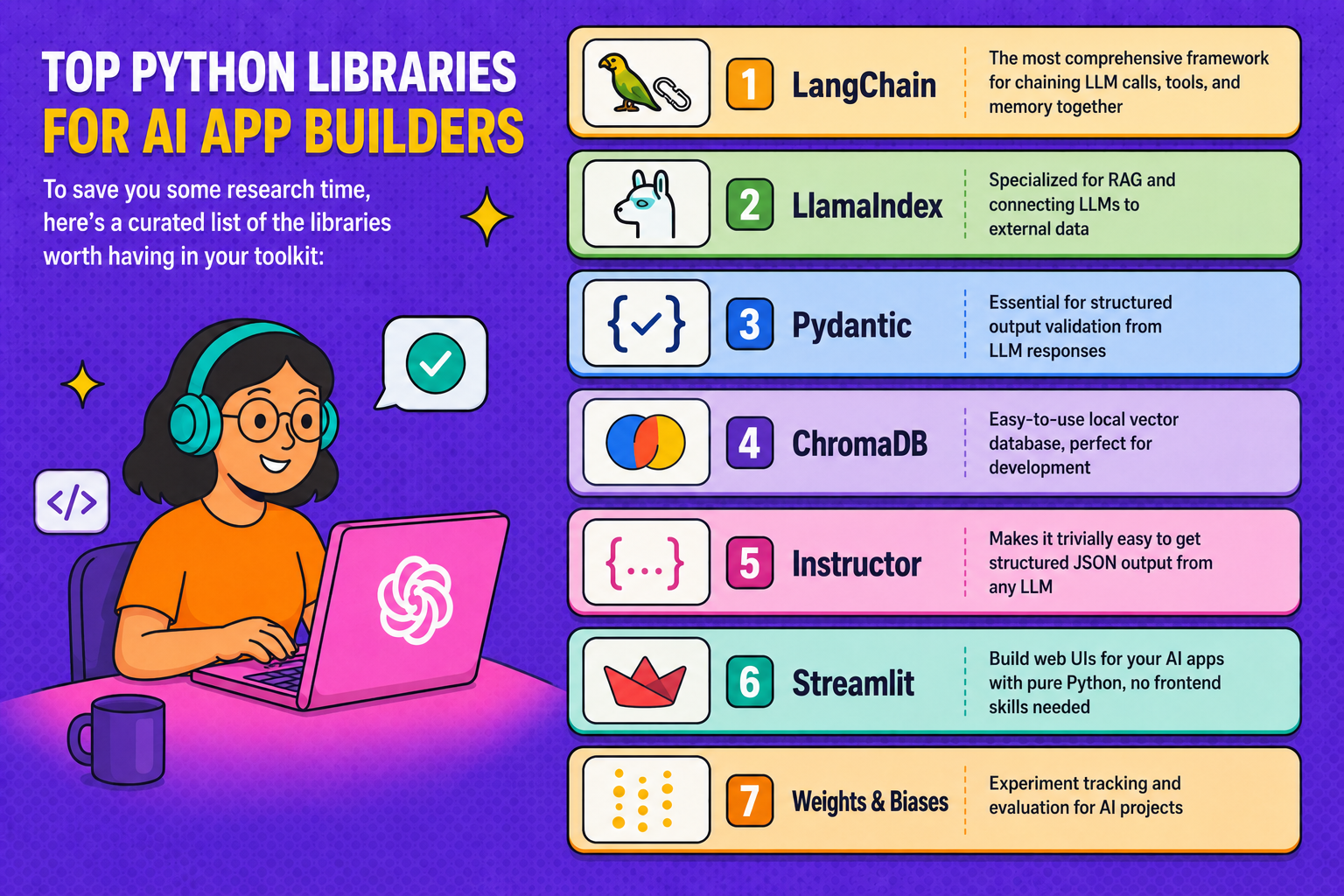
To save you some research time, here’s a curated list of the libraries worth having in your toolkit:
→ LangChain — The most comprehensive framework for chaining LLM calls, tools, and memory together
→ LlamaIndex — Specialized for RAG and connecting LLMs to external data
→ Pydantic — Essential for structured output validation from LLM responses
→ ChromaDB — Easy-to-use local vector database, perfect for development
→ Instructor — Makes it trivially easy to get structured JSON output from any LLM
→ Streamlit — Build web UIs for your AI apps with pure Python, no frontend skills needed
→ Weights & Biases — Experiment tracking and evaluation for AI projects
Building AI-powered apps with Python has never been more accessible — or more exciting. The tools are mature, the APIs are reliable, and the patterns are well-established enough that you don’t need to be a machine learning PhD to ship something genuinely impressive.
The key, as with any software project, is to start small, iterate quickly, and measure what matters. Pick one idea, get a working prototype in front of real users, and learn from what you see. The gap between a promising demo and a production-grade AI app is real, but it’s completely crossable with the right fundamentals in place.
Now stop reading and start building. Your AI-powered app isn’t going to write itself — well, actually, maybe parts of it will. That’s kind of the point.
Have questions about a specific part of your AI app build? Drop them in the comments below — we read every one.